187
2024
Snap!shot 2024
2024-07-31
2024-08-01
2
00:01
2024-07-31T16:30:00+02:00
14:30
00:10
Online Room 1
Plenary Session
741-welcome-to-snap-shot
Welcome to Snap!shot
Welcome to Snap!shot
Welcome to Snap!shot
false
Jadga Hügle
2024-07-31T16:40:00+02:00
14:40
00:07
Online Room 1
Lightning Talk
726-snapal-a-llm-here-to-help-you-with-snap-s-documentation
SnaPal: a LLM here to help you with Snap!'s documentation
In this lightning talk, we will speak on how we are utilizing Snap!'s ~400 page documentation, along with RAG (Retrieval-Augmented Generation) to create a LLM that pulls from the documentation in order to help answer common questions. We first have the Large Language Model process Snap!’s documentation and create an index, breaking down the 400 pages into a smaller, more searchable format. The Large Language Model, when prompted, will then search and utilize the most relevant chunk of text/images. This will be useful because it will remove learning friction and allow beginners access to tools they might not be aware of, as well as improving accessibility and is accurate and contextually relevant (due to it referencing the already created documentation).
In this lightning talk, we will speak on how we are utilizing Snap!'s ~400 page documentation, along with RAG (Retrieval-Augmented Generation) to create a LLM that pulls from the documentation in order to help answer common questions. We first have the Large Language Model process Snap!’s documentation and create an index, breaking down the 400 pages into a smaller, more searchable format. The Large Language Model, when prompted, will then search and utilize the most relevant chunk of text/images. This will be useful because it will remove learning friction and allow beginners access to tools they might not be aware of, as well as improving accessibility and is accurate and contextually relevant (due to it referencing the already created documentation).
false
Yuan Garcia
2024-07-31T16:40:00+02:00
14:40
00:10
Online Room 1
Lightning Talks Discussion
737-lightning-talks-1
Lightning Talks 1
Five 7 minute talks - get enlightened :)
Five 7 minute talks - get enlightened :)
false
2024-07-31T16:47:00+02:00
14:47
00:07
Online Room 1
Lightning Talk
718-sneak-preview-of-the-new-turtlestitch
Sneak Preview of the New Turtlestitch
A New Cloud UI and Project Content Segment
The [TurtleStitch](http://www.turtlestitch.org) journey began with its debut at the Scratch Conference in 2015, introducing its unique concept for creative coding with embroidery machines. Over the years, the SNAP!-based TurtleStitch has evolved, comprising two primary components: the coding interface and the user/project cloud. While these components have received regular updates, we recognized the need for a major enhancement and an additional offering for our user base.
In this talk, we will present a sneak preview of the new TurtleStitch cloud interface and introduce an exciting new component: a content segment featuring detailed project descriptions, akin to Instructables for TurtleStitch projects. Additionally, we will delve into our motivations behind these updates and share our vision for the future of TurtleStitch.
The [TurtleStitch](http://www.turtlestitch.org) journey began with its debut at the Scratch Conference in 2015, introducing its unique concept for creative coding with embroidery machines. Over the years, the SNAP!-based TurtleStitch has evolved, comprising two primary components: the coding interface and the user/project cloud. While these components have received regular updates, we recognized the need for a major enhancement and an additional offering for our user base.
In this talk, we will present a sneak preview of the new TurtleStitch cloud interface and introduce an exciting new component: a content segment featuring detailed project descriptions, akin to Instructables for TurtleStitch projects. Additionally, we will delve into our motivations behind these updates and share our vision for the future of TurtleStitch.
false
Andrea Mayr-Stalder
2024-07-31T16:54:00+02:00
14:54
00:07
Online Room 1
Lightning Talk
712-from-pattern-to-code
From Pattern to Code
Video Tutorial Resources for TurtleStitch.
**From Pattern to Code** is a series of videos that show how to develop code to create patterns in TurtleStitch. Using TurtleStitch means that patterns can then be stitched onto cloth using an embroidery machine enabling the creation of tangible objects.
These resources take a different approach to learning to code. Instead of focusing on key concepts in computing, or introducing commands and their function and building bottom-up from there, these resources present a range of images showing patterns, and exploring top-down from there how they can be created from code. Clicking on the image gives a short 2 minute video that explains how the pattern can be created using code.
The idea is to give people a reason to want to learn to program, and aims to inspire them to create their own patterns. Meanwhile it introduces them to useful concepts in computing and to become familiar with a range of commands. It gives valuable information about the context where its appropriate to use specific commands and shows how to apply them.
Videos are used because of the flexibility in use they offer. A video can be watched to get an idea about how to create the pattern, they can be paused, slowed down or restarted making it easy to follow key steps. The short duration of the videos is to minimise the time invested in deciding whether to create the pattern.
[www.warwick.ac.uk/turtlestitch/patterntocode](http://www.warwick.ac.uk/turtlestitch/patterntocode)
**From Pattern to Code** is a series of videos that show how to develop code to create patterns in TurtleStitch. Using TurtleStitch means that patterns can then be stitched onto cloth using an embroidery machine enabling the creation of tangible objects.
These resources take a different approach to learning to code. Instead of focusing on key concepts in computing, or introducing commands and their function and building bottom-up from there, these resources present a range of images showing patterns, and exploring top-down from there how they can be created from code. Clicking on the image gives a short 2 minute video that explains how the pattern can be created using code.
The idea is to give people a reason to want to learn to program, and aims to inspire them to create their own patterns. Meanwhile it introduces them to useful concepts in computing and to become familiar with a range of commands. It gives valuable information about the context where its appropriate to use specific commands and shows how to apply them.
Videos are used because of the flexibility in use they offer. A video can be watched to get an idea about how to create the pattern, they can be paused, slowed down or restarted making it easy to follow key steps. The short duration of the videos is to minimise the time invested in deciding whether to create the pattern.
[www.warwick.ac.uk/turtlestitch/patterntocode](http://www.warwick.ac.uk/turtlestitch/patterntocode)
false
Margaret Low
2024-07-31T17:01:00+02:00
15:01
00:07
Online Room 1
Lightning Talk
732-using-turtlestitch-to-teach-mathematics-and-computer-science
Using Turtlestitch to Teach Mathematics and Computer Science
an experience report from South Africa
South African Shweshwe Fabric contains beautiful geometric patterns that are ideal as a basis for different Turtlestitch designs. In our project we used these designs to teach learners from different township schools in Cape Town programming and geometry. In our talk we want to share our experiences from our initial events and our plan on how to extend the project in to future with peer learning and a curriculum.
South African Shweshwe Fabric contains beautiful geometric patterns that are ideal as a basis for different Turtlestitch designs. In our project we used these designs to teach learners from different township schools in Cape Town programming and geometry. In our talk we want to share our experiences from our initial events and our plan on how to extend the project in to future with peer learning and a curriculum.
false
Jadga Hügle
2024-07-31T17:08:00+02:00
15:08
00:07
Online Room 1
Lightning Talk
724-extending-extensions
Extending Extensions
Exploring Snap!'s Library and Extension Mechanisms to Create Custom Extensions
The extension and library mechanisms of Snap! offer significant opportunities to enhance and customize the user experience. In this talk, I will explore the power and flexibility of these mechanisms by recreating the BloP extension using only the "primitive" block, without modifying the software's source code. The BloP extension introduces advanced features for managing the visibility of block categories, blocks, sprites, and initialization scripts. This allows users to create “safe” IDEs for their custom block-based programming languages, ensuring they do not accidentally impair their language by removing vital sprites and scripts or changing the definition of language blocks. For this purpose, the “ide_” group of JavaScript functions within the “primitive” block will be primarily used.
The "primitive" block is designed to provide an effective method for creating extensions that can deeply interact with the Snap! environment without compromising the software's stability. I will demonstrate how the available primitives can replicate most of BloP’s functionalities and what enhancements are needed to allow new environments for block-based programming languages to be easily and safely recreated within Snap!.
The final extension does not improve upon the features already offered by previous versions of the BloP extension, but it provides significant insights into the design of the Snap! extension mechanism and, more importantly, it can be used inside the online version of the Snap! IDE.
The extension and library mechanisms of Snap! offer significant opportunities to enhance and customize the user experience. In this talk, I will explore the power and flexibility of these mechanisms by recreating the BloP extension using only the "primitive" block, without modifying the software's source code. The BloP extension introduces advanced features for managing the visibility of block categories, blocks, sprites, and initialization scripts. This allows users to create “safe” IDEs for their custom block-based programming languages, ensuring they do not accidentally impair their language by removing vital sprites and scripts or changing the definition of language blocks. For this purpose, the “ide_” group of JavaScript functions within the “primitive” block will be primarily used.
The "primitive" block is designed to provide an effective method for creating extensions that can deeply interact with the Snap! environment without compromising the software's stability. I will demonstrate how the available primitives can replicate most of BloP’s functionalities and what enhancements are needed to allow new environments for block-based programming languages to be easily and safely recreated within Snap!.
The final extension does not improve upon the features already offered by previous versions of the BloP extension, but it provides significant insights into the design of the Snap! extension mechanism and, more importantly, it can be used inside the online version of the Snap! IDE.
false
Stefano Federici
2024-07-31T17:25:00+02:00
15:25
00:25
Online Room 1
Break
735-break-1
Break 1
Enjoy a coffee or grab some food, we'll see you soon :)
Enjoy a coffee or grab some food, we'll see you soon :)
false
2024-07-31T17:50:00+02:00
15:50
00:07
Online Room 1
Lightning Talk
727-integrating-snap-into-prairielearn
Integrating Snap! into PrairieLearn
Enhancing Testing and Assignment Delivery
In this presentation, we explore the integration of Snap!, into PrairieLearn, a robust testing and assignment delivery platform. Building upon last year's advancements in Snap! autograders integrated with Gradescope, this session introduces a novel approach where students can seamlessly program within the PrairieLearn environment and submit their assignments without leaving the interface. This integration not only streamlines the student experience but also enhances instructor capabilities in assessing programming assignments.
Attendees will learn about the technical architecture behind this integration, including the challenges encountered and solutions devised to ensure a smooth user experience. We will discuss how the benefits of integrating Snap! with PrairieLearn expands the platform's utility beyond traditional coding environments. Practical examples and demonstrations will showcase the functionalities and efficiencies gained through this integration, illustrating its potential impact on programming education. We will also discuss the results of the student experience research studies we conducted in assessing the ease and effectiveness of using Snap! in PrairieLearn
In this presentation, we explore the integration of Snap!, into PrairieLearn, a robust testing and assignment delivery platform. Building upon last year's advancements in Snap! autograders integrated with Gradescope, this session introduces a novel approach where students can seamlessly program within the PrairieLearn environment and submit their assignments without leaving the interface. This integration not only streamlines the student experience but also enhances instructor capabilities in assessing programming assignments.
Attendees will learn about the technical architecture behind this integration, including the challenges encountered and solutions devised to ensure a smooth user experience. We will discuss how the benefits of integrating Snap! with PrairieLearn expands the platform's utility beyond traditional coding environments. Practical examples and demonstrations will showcase the functionalities and efficiencies gained through this integration, illustrating its potential impact on programming education. We will also discuss the results of the student experience research studies we conducted in assessing the ease and effectiveness of using Snap! in PrairieLearn
false
Victoria Phelps
2024-07-31T17:57:00+02:00
15:57
00:07
Online Room 1
Lightning Talk
715-smart-toys
Smart Toys
Snap! Programmable Playground Toys
**Concept Overview**:
The [Smart Toys](https://raw.githubusercontent.com/pixavier/meta4snap/main/st/video.mp4) playground is designed around programmable devices that form the core of an engaging and educational game.
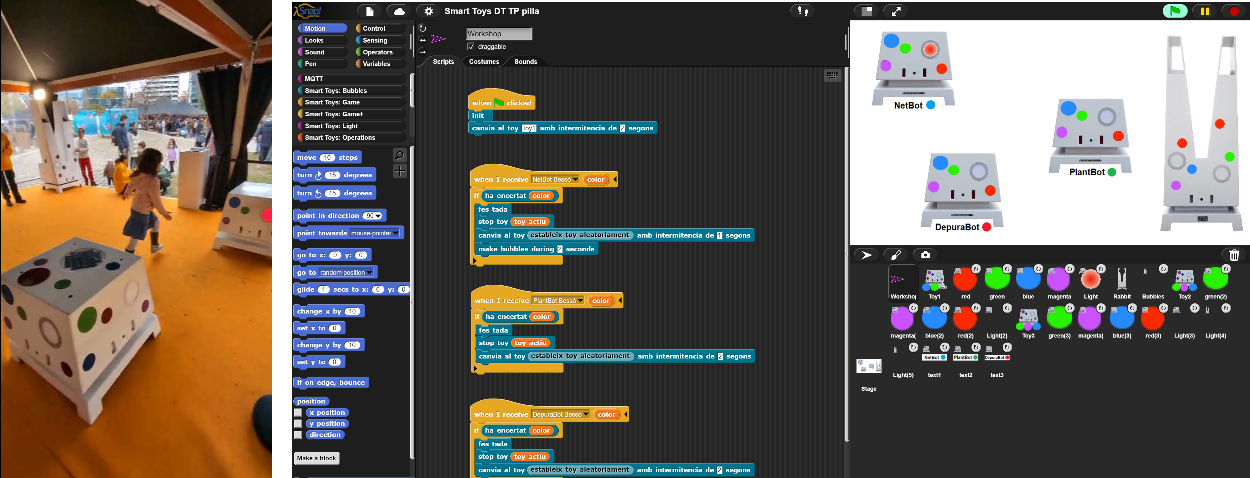
**The Game**: Chase the Colored Light
At the heart of this playground lies a simple yet captivating game called 'Chase the Colored Light.' Here’s how it works:
- A colored light appears at random locations within the playground.
- Children must run and touch the sensor that matches the color of the light.
- This game enhances quick thinking, color recognition, and physical agility as children chase and match the colors.
**Technological Integration**:
The magic behind the [Smart Toys](https://provisional.binefa.com/index.php/Smart_Toys) playground comes from the IoT Vertebrae open-source hardware project.
- Programmable Logic with Snap!:
- The game logic for 'Chase the Colored Light' can be programmed using Snap!
- This allows educators and kids to modify and create new game rules, fostering a creative and evolving play environment.
- Hardware - The [IoT Vertebrae](https://provisional.binefa.com/index.php/IoT-Vertebrae):
- Each toy is equipped with an IoT Vertebrae ([presented](https://www.youtube.com/watch?v=hoDaJh98o3k) at [Snap!Con2023](https://www.snapcon.org/conferences/2023/program/proposals/627)), a robust hardware platform tailored for Internet of Things (IoT) applications.
- The ESP32 and Raspberry Pi based IoT Vertebrae ensures reliable connectivity and interaction among the toys in the playground via the MQTT protocol.
- [Digital Twin](https://xavierpi.com/st) based [microworld](https://xavierpi.com/tp) in Snap!:
- To enhance the development and testing of new game rules, a digital twin based microworld of the playground has been created in Snap!.
- This microworld allows experimentation with powerful game logic ideas without disrupting the physical playground, enabling continuous innovation and refinement.
**Concept Overview**:
The [Smart Toys](https://raw.githubusercontent.com/pixavier/meta4snap/main/st/video.mp4) playground is designed around programmable devices that form the core of an engaging and educational game.

**The Game**: Chase the Colored Light
At the heart of this playground lies a simple yet captivating game called 'Chase the Colored Light.' Here’s how it works:
- A colored light appears at random locations within the playground.
- Children must run and touch the sensor that matches the color of the light.
- This game enhances quick thinking, color recognition, and physical agility as children chase and match the colors.
**Technological Integration**:
The magic behind the [Smart Toys](https://provisional.binefa.com/index.php/Smart_Toys) playground comes from the IoT Vertebrae open-source hardware project.
- Programmable Logic with Snap!:
- The game logic for 'Chase the Colored Light' can be programmed using Snap!
- This allows educators and kids to modify and create new game rules, fostering a creative and evolving play environment.
- Hardware - The [IoT Vertebrae](https://provisional.binefa.com/index.php/IoT-Vertebrae):
- Each toy is equipped with an IoT Vertebrae ([presented](https://www.youtube.com/watch?v=hoDaJh98o3k) at [Snap!Con2023](https://www.snapcon.org/conferences/2023/program/proposals/627)), a robust hardware platform tailored for Internet of Things (IoT) applications.
- The ESP32 and Raspberry Pi based IoT Vertebrae ensures reliable connectivity and interaction among the toys in the playground via the MQTT protocol.
- [Digital Twin](https://xavierpi.com/st) based [microworld](https://xavierpi.com/tp) in Snap!:
- To enhance the development and testing of new game rules, a digital twin based microworld of the playground has been created in Snap!.
- This microworld allows experimentation with powerful game logic ideas without disrupting the physical playground, enabling continuous innovation and refinement.
false
Xavier Pi
Jordi Binefa
2024-07-31T18:04:00+02:00
16:04
00:07
Online Room 1
Lightning Talk
729-quantum-computing-and-snap
Quantum Computing and Snap!
The second quantum revolution is upon us with billions of dollars being invested in quantum computing technologies by initiatives around the world. How will students be introduced to these technologies and their various potential applications across sectors? When introducing Snap! to physicists for feedback on how quantum computing might be incorporated, the graphical language of ZX-Calculus was proposed as a natural fit for the interface. Join for a brief introductory primer and preliminary thoughts on how these diagrams might be included in Snap!.
The second quantum revolution is upon us with billions of dollars being invested in quantum computing technologies by initiatives around the world. How will students be introduced to these technologies and their various potential applications across sectors? When introducing Snap! to physicists for feedback on how quantum computing might be incorporated, the graphical language of ZX-Calculus was proposed as a natural fit for the interface. Join for a brief introductory primer and preliminary thoughts on how these diagrams might be included in Snap!.
false
Mary Fries
2024-07-31T18:11:00+02:00
16:11
00:07
Online Room 1
Lightning Talk
730-the-art-of-paper-engineering-with-turtlestitch
The Art Of Paper Engineering With TurtleStitch
While TurtleStitch is known primarily for generating embroidery patterns, it can also be adapted for paper engineering projects. By harnessing the power of programming in TurtleStitch and cutting the design with an electronic paper cutting machine such as a Silhouette Cameo, a bridge from the digital to physical world can be created. Thereby, unlocking new possibilities of customizable paper designs. It is an educational tool which can teach geometry, engineering principles and spatial awareness.
In this talk, I will explain how I created a paper microscope using the art of paper engineering with TurtleStitch, https://turtlestitch.blogspot.com/2024/06/a-paper-microscope-coded-in-turtlestitch.html
While TurtleStitch is known primarily for generating embroidery patterns, it can also be adapted for paper engineering projects. By harnessing the power of programming in TurtleStitch and cutting the design with an electronic paper cutting machine such as a Silhouette Cameo, a bridge from the digital to physical world can be created. Thereby, unlocking new possibilities of customizable paper designs. It is an educational tool which can teach geometry, engineering principles and spatial awareness.
In this talk, I will explain how I created a paper microscope using the art of paper engineering with TurtleStitch, https://turtlestitch.blogspot.com/2024/06/a-paper-microscope-coded-in-turtlestitch.html
false
Elaine Wolfe
2024-07-31T18:18:00+02:00
16:18
00:07
Online Room 1
Lightning Talk
709-building-3d-worlds-in-a-snap
Building 3D Worlds in a Snap!
Scenario creation in RoboScape Online
At a previous Snap_!_con, we demonstrated a robotics simulation that runs in the NetsBlox/Snap_!_ interface. However, the environments the robots interact with were created in C# code, only the robot controller code was in Snap_!_. This made it infeasible for a student to contribute a new activity to the program.
However, our newest version has every environment built as a NetsBlox project, even when running on our server. These projects have access to (almost) all the usual NetsBlox/Snap! features, allowing for more diverse and more complex projects, while also making it easier to work with.
At a previous Snap_!_con, we demonstrated a robotics simulation that runs in the NetsBlox/Snap_!_ interface. However, the environments the robots interact with were created in C# code, only the robot controller code was in Snap_!_. This made it infeasible for a student to contribute a new activity to the program.
However, our newest version has every environment built as a NetsBlox project, even when running on our server. These projects have access to (almost) all the usual NetsBlox/Snap! features, allowing for more diverse and more complex projects, while also making it easier to work with.
false
Gordon Stein
2024-07-31T18:25:00+02:00
16:25
00:10
Online Room 1
Lightning Talks Discussion
738-lightning-talks-2
Lightning Talks 2
Five 7 minute talks - get enlightened :)
Five 7 minute talks - get enlightened :)
false
2024-07-31T18:40:00+02:00
16:40
00:03
Online Room 1
Show Your Project
711-mood-classifier-with-arblox
Mood classifier with ARBlox
A Simple Nearest Neighbors Project
The project uses ARBlox to classify the mood of the user. the user is able to collect data samples of custom expressions. Once data is collected, the user can infer their facial expression in real-time. The speed of the algorithm enables its use as a part of various expression driven games.
The project uses ARBlox to classify the mood of the user. the user is able to collect data samples of custom expressions. Once data is collected, the user can infer their facial expression in real-time. The speed of the algorithm enables its use as a part of various expression driven games.
false
Saman Kittani
2024-07-31T18:43:00+02:00
16:43
00:03
Online Room 1
Show Your Project
716-tackling-the-turing-test
Tackling the Turing Test
In the last few years, we have seen the advent of practical natural language processing in the form of various generative tools such as ChatGPT, Gemini, and many others. In fact, these tools are so powerful at understanding our requests and generating appropriate responses that many people have begun to ascribe these chatbots sentience and claim they mark the near-future of artificial general intelligence. Well, to get the bottom of this, let’s put them to the test! Using NetsBlox, a fork of Snap! that adds various networking features such as message passing over the internet, I have created a chatroom project where users can connect and be randomly matched either with another human or an instance of ChatGPT. Users can then engage in a back-and-forth turn-based dialog and see if they can tell the difference between man and machine.
In the last few years, we have seen the advent of practical natural language processing in the form of various generative tools such as ChatGPT, Gemini, and many others. In fact, these tools are so powerful at understanding our requests and generating appropriate responses that many people have begun to ascribe these chatbots sentience and claim they mark the near-future of artificial general intelligence. Well, to get the bottom of this, let’s put them to the test! Using NetsBlox, a fork of Snap! that adds various networking features such as message passing over the internet, I have created a chatroom project where users can connect and be randomly matched either with another human or an instance of ChatGPT. Users can then engage in a back-and-forth turn-based dialog and see if they can tell the difference between man and machine.
false
Devin Jean
2024-07-31T18:46:00+02:00
16:46
00:03
Online Room 1
Show Your Project
719-play-2-player-tic-tac-toe-perfectly-with-snap-gamesman-and-a-webcam
Play 2-player Tic-Tac-Toe Perfectly with Snap!, GAMESMAN, and a Webcam
The GAMESMAN system is a piece of software 35 years in the making -- it solves board games (2-person abstract strategy games of no chance), builds a database of the value (win, tie, or lose) for every position, and provides users with a GUI to play and analyze them. We recently opened up the API to allow any external client to access our database. At Snap!Con 2023 I demoed a Snap! program that played one-player Tic-Tac-Toe perfectly (the computer makes the moves for the second player) using our back-end as the "brains". The user specified their moves by clicking on a slot on the 3x3 board with their mouse.
For this year's Snap!Shot 2024 I added the ability to play 2-player Tic-Tac-Toe on a physical board, with a webcam recording the moves and Snap! displaying the value of the moves [from a stoplight: red=losing, yellow=tying, green=winning] for the player whose turn it is. You need blue and red pieces (poker chips work great), and blue (X) goes first.
- Demo: https://youtu.be/iV5MFALQObc
- Snap! project: https://snap.berkeley.edu/snap/snap.html#present:Username=dan%20garcia&ProjectName=Gamesman%20AR%20for%20TicTacToe
- Tic-Tac-Toe board: https://www.dropbox.com/scl/fi/mwvdpbbvvqgjlz81ng3cn/Tic-Tac-Toe-AR.pdf?rlkey=520myvv8e9s334sejukk6ddv5&dl=0
The GAMESMAN system is a piece of software 35 years in the making -- it solves board games (2-person abstract strategy games of no chance), builds a database of the value (win, tie, or lose) for every position, and provides users with a GUI to play and analyze them. We recently opened up the API to allow any external client to access our database. At Snap!Con 2023 I demoed a Snap! program that played one-player Tic-Tac-Toe perfectly (the computer makes the moves for the second player) using our back-end as the "brains". The user specified their moves by clicking on a slot on the 3x3 board with their mouse.
For this year's Snap!Shot 2024 I added the ability to play 2-player Tic-Tac-Toe on a physical board, with a webcam recording the moves and Snap! displaying the value of the moves [from a stoplight: red=losing, yellow=tying, green=winning] for the player whose turn it is. You need blue and red pieces (poker chips work great), and blue (X) goes first.
- Demo: https://youtu.be/iV5MFALQObc
- Snap! project: https://snap.berkeley.edu/snap/snap.html#present:Username=dan%20garcia&ProjectName=Gamesman%20AR%20for%20TicTacToe
- Tic-Tac-Toe board: https://www.dropbox.com/scl/fi/mwvdpbbvvqgjlz81ng3cn/Tic-Tac-Toe-AR.pdf?rlkey=520myvv8e9s334sejukk6ddv5&dl=0
false
Dan Garcia
2024-07-31T18:49:00+02:00
16:49
00:03
Online Room 1
Show Your Project
728-pokewan
Pokewan!
For my Computer Science Principles class, we were required to make a project in Snap. It could be anything we wanted, and I decided to make a top-down, Pokemon-inspired game in an 8-bit style. The player was able to explore a vast map, talking to characters and collecting 5 trinkets along the way. I spent a lot of time and effort into perfecting the code and drawing the sprites myself, and I hope you enjoy!
https://snap.berkeley.edu/snap/snap.html#present:Username=taliayy&ProjectName=Pokewan
For my Computer Science Principles class, we were required to make a project in Snap. It could be anything we wanted, and I decided to make a top-down, Pokemon-inspired game in an 8-bit style. The player was able to explore a vast map, talking to characters and collecting 5 trinkets along the way. I spent a lot of time and effort into perfecting the code and drawing the sprites myself, and I hope you enjoy!
https://snap.berkeley.edu/snap/snap.html#present:Username=taliayy&ProjectName=Pokewan
false
Talia Ye
2024-07-31T18:52:00+02:00
16:52
00:03
Online Room 1
Show Your Project
705-snap-hack
Snap!Hack
Implementing the classic roguelike Hack in Snap!
### Reimagining Hack using Snap!
Jay Fenlason, one of Brian Harvey's CS students at Lincoln-Sudbury Regional High School, was inspired to create an implementation of the computer game _Rogue_. Jay would call his game _Hack_ and it would become the basis for _NetHack_, a roguelike game that is still being updated and played today. There's even a later version of _Hack_ available as part of the BSD Games package for Linux and FreeBSD machines created by Andres Brouwer after Jay ceased working on the original _Hack_.
While the original _Hack_ sadly appears to be lost to bit rot, I thought it might be an interesting homage to Brian's work on _Snap!_ and Jay's seminal work on _Hack_ to implement an analogue to the original in _Snap!_ that I am calling _Snap!Hack_.
This demo will briefly display game play and include a discussion of the design decisions made in order to recreate _Hack_ on a modern computer in _Snap!_ Of course, you are welcome to play and remix the game yourself.
[View project on Snap!](https://snap.berkeley.edu/snap/snap.html#present:Username=dainialpadraig&ProjectName=Snap!Hack)
[View project on GitHub](https://github.com/Sustainable-Games/snaphack)
### Reimagining Hack using Snap!
Jay Fenlason, one of Brian Harvey's CS students at Lincoln-Sudbury Regional High School, was inspired to create an implementation of the computer game _Rogue_. Jay would call his game _Hack_ and it would become the basis for _NetHack_, a roguelike game that is still being updated and played today. There's even a later version of _Hack_ available as part of the BSD Games package for Linux and FreeBSD machines created by Andres Brouwer after Jay ceased working on the original _Hack_.
While the original _Hack_ sadly appears to be lost to bit rot, I thought it might be an interesting homage to Brian's work on _Snap!_ and Jay's seminal work on _Hack_ to implement an analogue to the original in _Snap!_ that I am calling _Snap!Hack_.
This demo will briefly display game play and include a discussion of the design decisions made in order to recreate _Hack_ on a modern computer in _Snap!_ Of course, you are welcome to play and remix the game yourself.
[View project on Snap!](https://snap.berkeley.edu/snap/snap.html#present:Username=dainialpadraig&ProjectName=Snap!Hack)
[View project on GitHub](https://github.com/Sustainable-Games/snaphack)
false
Dan Stormont
2024-07-31T18:55:00+02:00
16:55
00:30
Online Room 1
Show Your Project Free Time
740-show-your-project-session
Show Your Project Session
3 minutes, no slides 💥💥💥
3 minutes, no slides 💥💥💥
false
2024-07-31T19:25:00+02:00
17:25
00:25
Online Room 1
Break
736-break-2
Break 2
Enjoy a coffee or grab some food, we'll see you soon :)
Enjoy a coffee or grab some food, we'll see you soon :)
false
2024-07-31T19:50:00+02:00
17:50
00:07
Online Room 1
Lightning Talk
725-embedding-big-ideas-in-projects
Embedding big ideas in projects
Pedagogy and engagement need to go hand in hand. The main questions I ask when arranging a project are:
* Is it fun? If not, can't I do better for my students?
* Does it embed big ideas naturally so the learning doesn't feel forced?
* Does it leverage the best features of the programming language?
* Is it accessible to everyone in the room?
I offer three projects that I believe address all three of these questions:
* Analog clock (anchors, number sense, angles, synchronized movements)
* Breakout (clones and game play)
* Fractal tree (pretty graphics and math regarding what it means for a problem to be solvable)
All of these have been hits with my students and I think they are worth thinking about carefully.
Pedagogy and engagement need to go hand in hand. The main questions I ask when arranging a project are:
* Is it fun? If not, can't I do better for my students?
* Does it embed big ideas naturally so the learning doesn't feel forced?
* Does it leverage the best features of the programming language?
* Is it accessible to everyone in the room?
I offer three projects that I believe address all three of these questions:
* Analog clock (anchors, number sense, angles, synchronized movements)
* Breakout (clones and game play)
* Fractal tree (pretty graphics and math regarding what it means for a problem to be solvable)
All of these have been hits with my students and I think they are worth thinking about carefully.
false
Josh Paley
2024-07-31T19:57:00+02:00
17:57
00:07
Online Room 1
Lightning Talk
704-what-turtles-can-and-can-t-teach
What Turtles Can (and Can't) Teach
A Brief Examination of Drawing in 2D
Turtlestitch is great for small scale embroidery. But can it be used for other fiber arts domains like quilting? In pursuit of an answer I've explored turtle geometry, cartesian solutions and most recently event driven data capture. This lightening talk will demonstrate where turtles prevail as both a pedagogical and functionally useful tool. But it will also suggest that bridges to task often called 'advanced' in both fiber art and computer programming may be problematic with turtles. This quick presentation will provide a half dozen small projects: (1) pure turtle, (2) pure cartesian, (3) pure data capture, (4) turtles with cartesian, (5) turtles and data capture, (6) cartesian and data capture. Of course there will be commentary on how keeping an open mind about purpose and pedagogy allows the student to define their own goals while learning powerful ideas in fiber arts, computer science and math. Full turtlestitch projects used in this presentation will be labeled as "SnapShotNN" at https://turtlestitch.org/users/ursulawolz or email ursula.wolz@gmail.com
Turtlestitch is great for small scale embroidery. But can it be used for other fiber arts domains like quilting? In pursuit of an answer I've explored turtle geometry, cartesian solutions and most recently event driven data capture. This lightening talk will demonstrate where turtles prevail as both a pedagogical and functionally useful tool. But it will also suggest that bridges to task often called 'advanced' in both fiber art and computer programming may be problematic with turtles. This quick presentation will provide a half dozen small projects: (1) pure turtle, (2) pure cartesian, (3) pure data capture, (4) turtles with cartesian, (5) turtles and data capture, (6) cartesian and data capture. Of course there will be commentary on how keeping an open mind about purpose and pedagogy allows the student to define their own goals while learning powerful ideas in fiber arts, computer science and math. Full turtlestitch projects used in this presentation will be labeled as "SnapShotNN" at https://turtlestitch.org/users/ursulawolz or email ursula.wolz@gmail.com
false
Ursula Wolz
2024-07-31T20:04:00+02:00
18:04
00:07
Online Room 1
Lightning Talk
708-create-with-beatblox
Create with BeatBlox
BeatBlox is an extension of NetBlox. It consists of a family of blocks used for music creation. Adding blocks for playing instruments, playing sounds, recording and exporting audio.
In this talk I am going to give usages and examples of BeatBlox and also discuss how we aim to use BeatBlox to encourage students to learn Computer Science in an engaging way. Specifically showcasing is networking, distributed computing, improved sonics, and instrument library. Built with WebAudio API as its foundation, BeatBlox is optimized for modern browsers.
BeatBlox is an extension of NetBlox. It consists of a family of blocks used for music creation. Adding blocks for playing instruments, playing sounds, recording and exporting audio.
In this talk I am going to give usages and examples of BeatBlox and also discuss how we aim to use BeatBlox to encourage students to learn Computer Science in an engaging way. Specifically showcasing is networking, distributed computing, improved sonics, and instrument library. Built with WebAudio API as its foundation, BeatBlox is optimized for modern browsers.
false
ebiwonop
2024-07-31T20:11:00+02:00
18:11
00:07
Online Room 1
Lightning Talk
710-arblox-an-augmented-reality-extension
ARBlox, an Augmented Reality Extension
Augmented Reality (AR) allows for novel methods of human-computer interaction impossible through traditional devices. It also fosters engagement through its inherently visual nature. ARBlox, a NetsBlox extension, expands upon the existing AR programming environments (e.g., Augmented-Reality Scratch) by offering expanded capabilities whilst remaining accessible. ARBlox enables hand, face, and body tracking. It also incorporates fiducial marker tracking (e.g., AprilTags) and 3D object rendering. There is a key distinction between ARBlox and existing tools; ARBlox provides users unfettered access to data output. As a result, users are able to create complex AR projects, such as mood classifiers and virtual instruments. Using custom blocks, we are able to abstract away these complexities for beginners. With the tools appeal to expert users and accessibility to novice learners, ARBlox has the potential to be a key tool in computer science education.
Augmented Reality (AR) allows for novel methods of human-computer interaction impossible through traditional devices. It also fosters engagement through its inherently visual nature. ARBlox, a NetsBlox extension, expands upon the existing AR programming environments (e.g., Augmented-Reality Scratch) by offering expanded capabilities whilst remaining accessible. ARBlox enables hand, face, and body tracking. It also incorporates fiducial marker tracking (e.g., AprilTags) and 3D object rendering. There is a key distinction between ARBlox and existing tools; ARBlox provides users unfettered access to data output. As a result, users are able to create complex AR projects, such as mood classifiers and virtual instruments. Using custom blocks, we are able to abstract away these complexities for beginners. With the tools appeal to expert users and accessibility to novice learners, ARBlox has the potential to be a key tool in computer science education.
false
Saman Kittani
2024-07-31T20:18:00+02:00
18:18
00:07
Online Room 1
Lightning Talk
723-what-coding-in-snap-might-look-like-10-years-from-now
What coding in Snap! might look like 10 years from now
Or, why the Apple Vision Pro and CoPilot might just be the first step...
The Apple Vision Pro (AVP) has been called a “game-changing device”, allowing for a seamless blending of an augmented reality world locked in 3D space above your surroundings. Having explored coding in Snap! with the AVP, with the blocks floating above my table, and coding as simple as moving and pinching in space, it got us thinking what the experience might be like 10 years from now:
- Right now, Snap! on the AVP exists only within a Safari browser, but all the most immersive and intuitive AVP experiences are stand-alone apps designed specifically for the affordances the AVP provides. The Scratch foundation did this with “ScratchJr” on the iPad and iPhone.
- There is an incredible amount of "3D real estate" with the AVP – enough that Snap! could have _all blocks visible at once_ (i.e., not hidden behind tabs), but floating in 3D space like a rolodex, perhaps, or side-by-side to the left and wrapping around a person.
- Selecting a paint editor could select Apple's built-in Freeform drawing app (or any other app a user wanted, like Photoshop). Similar for the sound editor.
- Everything done with gestures (what the mouse currently does) could also be accomplished by voice and looking at things – the voice equivalent of “keyboard input”.
- AI will probably support us in most of our everyday tasks ten years from now, so it's natural to think that there will be an AI assistant helping us code. It might point out potential bugs before the green flag was clicked, suggest the next block based on what we're doing, or even author small utility blocks for us (if we asked for it and provided a clear spec).
- The "stage" might extend to be a real "3D stage", with sprites available in 2D (as transparent PNG textures on always-facing-the-user polygons ala Doom) 3D. This might allow us to connect with the Alice user community and their resources. At the very least (even if we stuck with a 2D stage), we would be able to “turn” the stage to see what sprites were in front of and behind each other to debug a complicated scene where things were hidden.
- We might see some of the features users have dreamed about implemented: collaborative editing ala Google Docs, the ability to select a group of blocks (ala Illustrator) and delete/move/duplicate them, auto-save with a “history” feature that could roll back to any previous version, etc.
In summary, it's fun to dream about what life in Snap! will be like years from now, and this lightning talk will paint a picture of one such future.
The Apple Vision Pro (AVP) has been called a “game-changing device”, allowing for a seamless blending of an augmented reality world locked in 3D space above your surroundings. Having explored coding in Snap! with the AVP, with the blocks floating above my table, and coding as simple as moving and pinching in space, it got us thinking what the experience might be like 10 years from now:
- Right now, Snap! on the AVP exists only within a Safari browser, but all the most immersive and intuitive AVP experiences are stand-alone apps designed specifically for the affordances the AVP provides. The Scratch foundation did this with “ScratchJr” on the iPad and iPhone.
- There is an incredible amount of "3D real estate" with the AVP – enough that Snap! could have _all blocks visible at once_ (i.e., not hidden behind tabs), but floating in 3D space like a rolodex, perhaps, or side-by-side to the left and wrapping around a person.
- Selecting a paint editor could select Apple's built-in Freeform drawing app (or any other app a user wanted, like Photoshop). Similar for the sound editor.
- Everything done with gestures (what the mouse currently does) could also be accomplished by voice and looking at things – the voice equivalent of “keyboard input”.
- AI will probably support us in most of our everyday tasks ten years from now, so it's natural to think that there will be an AI assistant helping us code. It might point out potential bugs before the green flag was clicked, suggest the next block based on what we're doing, or even author small utility blocks for us (if we asked for it and provided a clear spec).
- The "stage" might extend to be a real "3D stage", with sprites available in 2D (as transparent PNG textures on always-facing-the-user polygons ala Doom) 3D. This might allow us to connect with the Alice user community and their resources. At the very least (even if we stuck with a 2D stage), we would be able to “turn” the stage to see what sprites were in front of and behind each other to debug a complicated scene where things were hidden.
- We might see some of the features users have dreamed about implemented: collaborative editing ala Google Docs, the ability to select a group of blocks (ala Illustrator) and delete/move/duplicate them, auto-save with a “history” feature that could roll back to any previous version, etc.
In summary, it's fun to dream about what life in Snap! will be like years from now, and this lightning talk will paint a picture of one such future.
false
Dan Garcia
2024-07-31T20:25:00+02:00
18:25
00:10
Online Room 1
Lightning Talks Discussion
739-lightning-talks-3
Lightning Talks 3
Five 7 minute talks - get enlightened :)
Five 7 minute talks - get enlightened :)
false
2024-07-31T20:40:00+02:00
18:40
01:00
Online Room 1
Keynote
743-what-s-new-in-snap-10
What's new in Snap! 10
Get to know what's new in Snap!
Get to know what's new in Snap!
false
Jens Mönig
2024-07-31T21:40:00+02:00
19:40
00:10
Online Room 1
Plenary Session
742-goodbye-day-1
Goodbye Day 1
Day 1 is a warp, we see you tomorrow for BoFs ❤️
Day 1 is a warp, we see you tomorrow for BoFs ❤️
false
2024-08-01T17:20:00+02:00
15:20
00:10
Online Room 1
Plenary Session
744-welcome-to-bof-day
Welcome to BoF Day
Let's discuss, share and create ❤️
Let's discuss, share and create ❤️
false
Jadga Hügle
2024-08-01T17:30:00+02:00
15:30
01:00
Online Room 1
Birds of a Feather
707-using-snap-to-teach-mathematics
Using Snap! to teach mathematics
Using visualizations and algorithms to teach mathematics
Snap! can be used in teaching mathematics to visualize mathematical concepts or to use algorithms to do calculations which are either difficult or tiresome to do with a calculator.
In this session participants have an opportunity to exchange examples from their own teaching practice.
Examples: [https://snap.berkeley.edu/user?username=mattgig](https://snap.berkeley.edu/user?username=mattgig)
Snap! can be used in teaching mathematics to visualize mathematical concepts or to use algorithms to do calculations which are either difficult or tiresome to do with a calculator.
In this session participants have an opportunity to exchange examples from their own teaching practice.
Examples: [https://snap.berkeley.edu/user?username=mattgig](https://snap.berkeley.edu/user?username=mattgig)
false
Matthias Giger
2024-08-01T18:40:00+02:00
16:40
01:00
Online Room 1
Birds of a Feather
720-supporting-snap-students-in-a-transition-to-python
Supporting Snap! Students in a Transition to Python
Most of us agree that Snap! is the perfect language for beginning programmers. When students ask us “What is the next language to learn?” the answer is often "Python". That transition is often rocky: Python's 0-indexing, = vs ==, quotes around strings, while-vs-repeat-until, and no spaces allowed in variables or functions are just some of the challenges students face.
However, there's hope. Snap! new Python-like features like the “^” block, “item (numbers from __ to __) of _data_” hyperblock slicing, and allowing non-numeric values to be dictionary keys in “item _key_ of _data_” makes the transition that much easier. Snap! has the “codification” example that can export code to Python. There's a demo “split-screen” website that lets someone code Snap! on the left and the Python equivalent shows up on the right (“live” codification, if you will). UC Berkeley's Beauty and Joy of Computing (BJC) course provides lectures, videos, discussion worksheets, and labs to help the transition. EDC's AP CS Principles BJC site has an "Other Programming Languages" page with resources they are developing, since the AP CSP exam's questions are now in Python (they had been in a Snap!-like pseudocode-language). Are there other opportunities and resources like that? Could Large Language Models help?
Let's gather in this BoF session to discuss experiences guiding students through that process, share software and curricular support, etc.
Most of us agree that Snap! is the perfect language for beginning programmers. When students ask us “What is the next language to learn?” the answer is often "Python". That transition is often rocky: Python's 0-indexing, = vs ==, quotes around strings, while-vs-repeat-until, and no spaces allowed in variables or functions are just some of the challenges students face.
However, there's hope. Snap! new Python-like features like the “^” block, “item (numbers from __ to __) of _data_” hyperblock slicing, and allowing non-numeric values to be dictionary keys in “item _key_ of _data_” makes the transition that much easier. Snap! has the “codification” example that can export code to Python. There's a demo “split-screen” website that lets someone code Snap! on the left and the Python equivalent shows up on the right (“live” codification, if you will). UC Berkeley's Beauty and Joy of Computing (BJC) course provides lectures, videos, discussion worksheets, and labs to help the transition. EDC's AP CS Principles BJC site has an "Other Programming Languages" page with resources they are developing, since the AP CSP exam's questions are now in Python (they had been in a Snap!-like pseudocode-language). Are there other opportunities and resources like that? Could Large Language Models help?
Let's gather in this BoF session to discuss experiences guiding students through that process, share software and curricular support, etc.
false
Victoria Phelps
Parinaz Dastur
Talia Ye
Delnavaz Dastur
Mary Fries
Yuan Garcia
Michael Ball
Dan Garcia
2024-08-01T19:40:00+02:00
17:40
00:25
Online Room 1
Break
745-break
Break
Enjoy a coffee or grab some food, we'll see you soon :)
Enjoy a coffee or grab some food, we'll see you soon :)
false
2024-08-01T20:05:00+02:00
18:05
01:00
Online Room 1
Birds of a Feather
721-translating-snap-and-curriculum-built-on-snap-to-non-english-languages
Translating Snap! (and curriculum built on Snap!) to non-English languages
...objects in mirror are larger than they appear...
Snap! is available in 47 languages, and has a truly international community of users. The architecture that has made that possible, and the efforts of the folks who have helped with those translations, are deeply appreciated.
However, having worked for the last two years to translate the Beauty and Joy of Computing (BJC) AP CS Principles curriculum to Spanish, we have discovered that what might seem like a simple task of moving a curriculum to another language, revealed a remarkable list of inter-dependencies on English and difficulties in managing that large project. So many tasks were labor-intensive, and scripting didn't help. Among the challenges:
- There was no automated way to translate all the hundreds of PNG images of blocks. “Smart PNGs” (with the XML embedded in the metadata) is amazing and now allows for automation, but the images were created _before_ that feature existed. Animated gifs showing how to do something had to be recreated by hand.
- Not all the blocks (or error messages, or menu items, or dialog boxes) in Snap! have been translated to all 47 languages, since once a translation is created, and new features are added, all translation teams need to be informed about the additions. Perhaps a team needs to realize it's not a one-and-done process and check back in every 6 months?
- Snap! help text currently only exists in English
- A curriculum translation often takes a fair amount of time, and sometimes the curriculum or Snap! changes before it's done, so managing those different versions can be difficult.
Could automation and large language models help? Should there be a “translation regression test” feature? It would go through all the blocks, libraries, menus, dialogs, help screens, etc. and create a PDF with three columns: the English on the left, the translation on the right, and the place in the translation file to make the change.
These are just some ideas we'd like to explore in this BoF. If you have been involved in any translations of Snap! (or curriculum built on it), please share best (and worst) practices. If you have ideas to leverage automation or tooling to help with future translations, please attend and share your thoughts!
Snap! is available in 47 languages, and has a truly international community of users. The architecture that has made that possible, and the efforts of the folks who have helped with those translations, are deeply appreciated.
However, having worked for the last two years to translate the Beauty and Joy of Computing (BJC) AP CS Principles curriculum to Spanish, we have discovered that what might seem like a simple task of moving a curriculum to another language, revealed a remarkable list of inter-dependencies on English and difficulties in managing that large project. So many tasks were labor-intensive, and scripting didn't help. Among the challenges:
- There was no automated way to translate all the hundreds of PNG images of blocks. “Smart PNGs” (with the XML embedded in the metadata) is amazing and now allows for automation, but the images were created _before_ that feature existed. Animated gifs showing how to do something had to be recreated by hand.
- Not all the blocks (or error messages, or menu items, or dialog boxes) in Snap! have been translated to all 47 languages, since once a translation is created, and new features are added, all translation teams need to be informed about the additions. Perhaps a team needs to realize it's not a one-and-done process and check back in every 6 months?
- Snap! help text currently only exists in English
- A curriculum translation often takes a fair amount of time, and sometimes the curriculum or Snap! changes before it's done, so managing those different versions can be difficult.
Could automation and large language models help? Should there be a “translation regression test” feature? It would go through all the blocks, libraries, menus, dialogs, help screens, etc. and create a PDF with three columns: the English on the left, the translation on the right, and the place in the translation file to make the change.
These are just some ideas we'd like to explore in this BoF. If you have been involved in any translations of Snap! (or curriculum built on it), please share best (and worst) practices. If you have ideas to leverage automation or tooling to help with future translations, please attend and share your thoughts!
false
Mary Fries
Dan Garcia
2024-08-01T21:05:00+02:00
19:05
00:10
Online Room 1
Plenary Session
747-goodbye-day-2
Goodbye Day 2
Snap!shot is already over again.
We'll see you next year.
Snap!shot is already over again.
We'll see you next year.
false
2024-08-01T18:40:00+02:00
16:40
01:00
Online Room 2
Birds of a Feather
717-thinking-about-thinking-about-coding
Thinking about thinking about coding
A conversation about how to tackle a coding project in Snap!
In the past few years I've used Turtlestitch for 'serious' projects involving embroidery and quilting. I've also taught intro computer science for over 40 years. I've developed a systematic way of tackling a project by experimenting with 'hat blocks', then adding variables, then creating my own blocks only where necessary. I have a bunch of tricks as well, such as gathering my 'paints' (e.g. blocks I need) into the workspace and then duplicating them rather than switching between block categories. I'm sure other experienced blocks language coders have their own systems. I'd like to share them in a semi structured setting. I'll spend about 5 minutes demoing what I do and then open it up for discussion. Others are welcome to show how they tackle a problem as well. In the spirit of "you can't think seriously about thinking without thinking about thinking about something" the goal here is, as a group to identify techniques for navigating the blocks environment in a way that keeps the coder focused on the goal while simultaneously supporting the serendipity of discovery. A part of this, of course, is articulating how to deal with "why isn't this working?" This is a collaborative conversation, not a formal presentation.
In the past few years I've used Turtlestitch for 'serious' projects involving embroidery and quilting. I've also taught intro computer science for over 40 years. I've developed a systematic way of tackling a project by experimenting with 'hat blocks', then adding variables, then creating my own blocks only where necessary. I have a bunch of tricks as well, such as gathering my 'paints' (e.g. blocks I need) into the workspace and then duplicating them rather than switching between block categories. I'm sure other experienced blocks language coders have their own systems. I'd like to share them in a semi structured setting. I'll spend about 5 minutes demoing what I do and then open it up for discussion. Others are welcome to show how they tackle a problem as well. In the spirit of "you can't think seriously about thinking without thinking about thinking about something" the goal here is, as a group to identify techniques for navigating the blocks environment in a way that keeps the coder focused on the goal while simultaneously supporting the serendipity of discovery. A part of this, of course, is articulating how to deal with "why isn't this working?" This is a collaborative conversation, not a formal presentation.
false
Ursula Wolz